
With this tutorial I am going to show you a way to draw a vey simple Christmas tree.
1. Start by creating a new document. Select the “Rectangle Tool” set the color to green and draw a square. (Hold Shift while you draw your square)
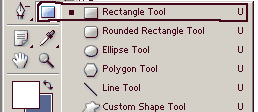
You should now have a square like this.

2. Press Ctrl+T and rotate the square 45 degrees (Alternatively you can go to Edit->Transform->Rotate)

3. Now get the Delete Anchor Point Tool
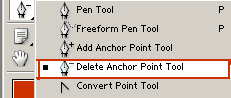
and delete the anchor point that is circled in the next screenshot

4. You should now have a triangle.

Duplicate this Photoshop layer two times (Ctrl+J)
5. Now we are going to resize the two layer copies. First resize copy number one to 85% of the original size

and copy number two to 70% of the original size

6. Get the move tool and move the two layer copies like shown below

7. Now we are going to apply some layer styles. Apply these styles to all the layers.


Here is what we get

8. We are almost done. Now we are going to add a few details get the Rectangle Tool and add the tree’s base

Pick a round hard brush and add a few christmas balls, you can also add a star on top of the tree or presents below it etc.
Here is my final result

Comments are closed.